

Overview
Patient-facing MedTech services like patient portals, telehealth, digital therapeutics, bill pay portals and others are part of a highly regulated system. While they collect the same information as in-person visits, the digital experience adds a layer of uncertainty. This can make patients feel vulnerable.
Nearly 75% of patients are concerned about the privacy of personal health information (PHI) in an increasingly digitized medical landscape. Many feel confused and uninformed about who their data is shared with.
There are two problems here.
The first is security. Patients want to know that the organization takes seriously their responsibility to protect the PHI they’re being entrusted with against cyber attacks and data breaches.
The second is privacy. Patients want to know what happens to the data once they give it. They want to know if it will be shared with third parties, what information will be shared, with whom, and how.
Content Designers have an opportunity to build trust and a sense of security early in the user experience.
Elements of onboarding
Onboarding experiences often jump straight into account creation, but might also promote features, or a preview of the steps to sign up. Let’s dive into a few areas where content design can make a difference for patients.
Feature promotion
This section may or may not be included in onboarding. If it is, it usually doesn’t collect data. Instead it tells patients what features the user can expect inside the app. There’s still an opportunity here to include security among these highlighted features. This tells patients the safety of their data is as important to the organization as it is to them.
Step Overview
The organization still isn’t collecting data at this point. But it’s one place to reassure patients their account will be locked to anyone else.
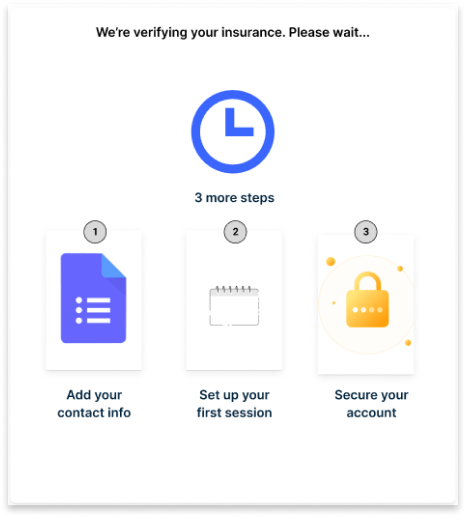
Gathering data
Intake forms
Whether an app starts with verifying insurance or collecting personal information, the patient will have to enter some personal details.
The first opportunity here is to let the patient know what to expect from the form, and how it will be used.
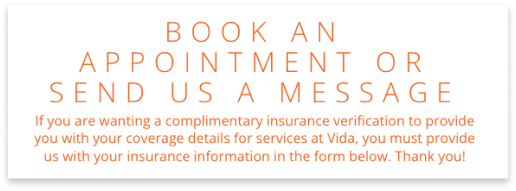
Most people feel comfortable including their name, maybe their email. But other details may give them pause.
Whether it is through instruction copy, microcopy, or an info tip, give the user the opportunity to understand why you are asking and what the information will be used for.

Agreements and acknowledgements
What I love about in-person appointments at my clinic is that when the medical receptionist hands me a policy to review, they also verbally explain what it contains.
The same should go for a digital medical experience.
Policy documents can be visually dense and laden with medical, technical, and legal jargon. This can add to the feelings of confusion, vulnerability, and concern.
Technical agreements add one more layer to this.
Still, many of these agreements and acknowledge are legally required to be present at the time the user creates an account. The first step is to limit the agreements to only the ones required. Other policies can come later.
Then, convey the information in an understandable way. Policy documents are notorious for being visually dense and filled with jargon. Certain terms or phrases may be legally required. That can’t be helped. But, wherever possible take the extra step to help patients understand what they are agreeing to.
This could look like using language that is easy to understand when writing policies.

If that’s not possible, write a brief overview of the contents of the documents.
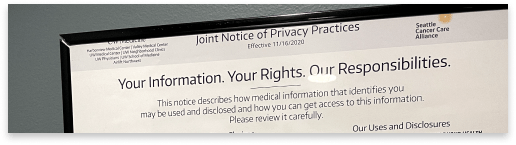
While these examples come from the Notice of Privacy Practices posted on the wall of the the clinic I go to, it’s a great model for how these elements can be done in the app.
Creating a password
Recommendations for password requirements are fairly standard:
- at least 8 characters
- use upper- and lowercase letters, numbers, and special characters
- be hard for someone to guess
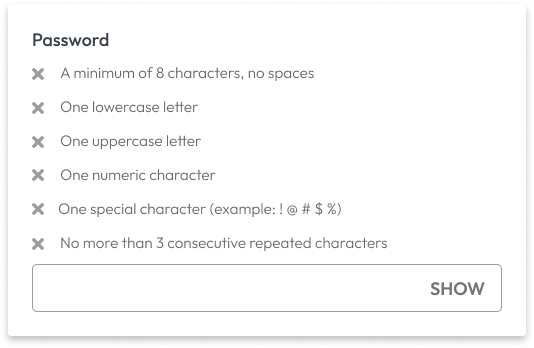
Use instructions or microcopy to tell patients all the requirements for creating a new, unique password. Do not hide the requirements until the field is in focus or in an error message.
Other secure login options
Organizations may add other login options like security questions, 2FA, or biometric scanning. Especially in the case of using biometrics, patients may be afraid it’s one more piece of personal data they are giving up. They may opt out, losing out on an extra level of security.
Help the user understand how these are beneficial to the user.

Get creative
Onboarding may not look the same from app to app. So there may be unique ways organizations can find to assure their patients of their data’s safety.
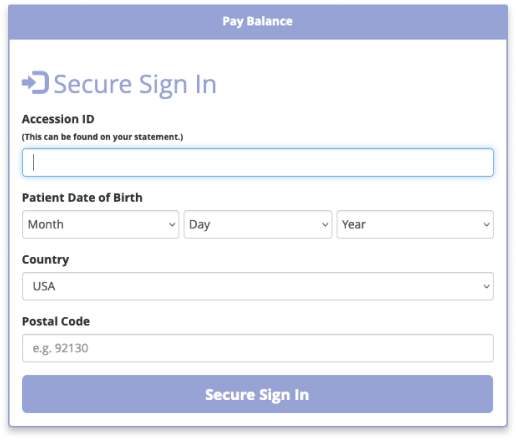
In this example, the organization has emphasized that the patient’s information will be secure in both the heading and cta of this form.
Final Thoughts
Patients may feel vulnerable when handing over personal information to digital care spaces. But organizations have many opportunities early on in the user experience to reassure patients they will take care of their information. Content designers can help identify where patients could hesitate and craft creative solutions to address those concerns. When patients feel comfortable, health care apps can enhance the patient experience, fitting seamlessly into the continuum of care.
References
https://papers.ssrn.com/sol3/papers.cfm?abstract_id=2757465
https://us.norton.com/blog/privacy/password-statistics
https://www.intechnic.com/blog/ux-writing-for-digital-patient-centricity/
https://www.hipaaguide.net/hippa-password-requirements/
https://www.oomphinc.com/insights/healthcare-ux-best-practices-engaging-patients/
https://www.interaction-design.org/literature/article/ethics-and-the-user-experience-privacy
https://nixstech.com/news/fear-and-loathing-in-ux-writing-when-users-read-privacy-policies/
https://www.altexsoft.com/blog/privacy-ux/
Interested in partnering? Let’s talk to see how I can help you create a comfortable digital health experience. Drop me a note at evy.haan@gmail.com.
Cover photo by Kaffeebart on Unsplash.
 Evy Haan | Content Designer & UX Writer